# Blitztext — User Manual
A reference for every setting in the Blitztext **Settings** window, page by page.
Open Settings from the system-tray menu (**Settings…**) or the control panel. The
sidebar lists all pages: **Presets · General · Keyboard · Wakeword · STT Engines ·
LLM Engines · Benchmark — STT · Benchmark — Wakeword · Log · Manual · About**.
Three buttons run along the top: **Save**, **Save & Restart**, and **✕ Close**.
> **Where settings are stored:** `~/.config/blitztext/config.toml`
> (or `$XDG_CONFIG_HOME/blitztext/config.toml`). You can edit that file directly;
> the relevant TOML key is noted next to each setting below.
### Saving your changes
| Button | What it does |
|---|---|
| **Close** | Discard and close. Nothing is written. |
| **Save** | Write `config.toml`. A note reminds you that **engine/hotkey changes need a restart** to take effect. |
| **Save & Restart** | Write `config.toml` and immediately relaunch Blitztext (`blitztext tray`) so every change applies. Use this after changing engines, hotkeys, or the wakeword. |
---
## Presets
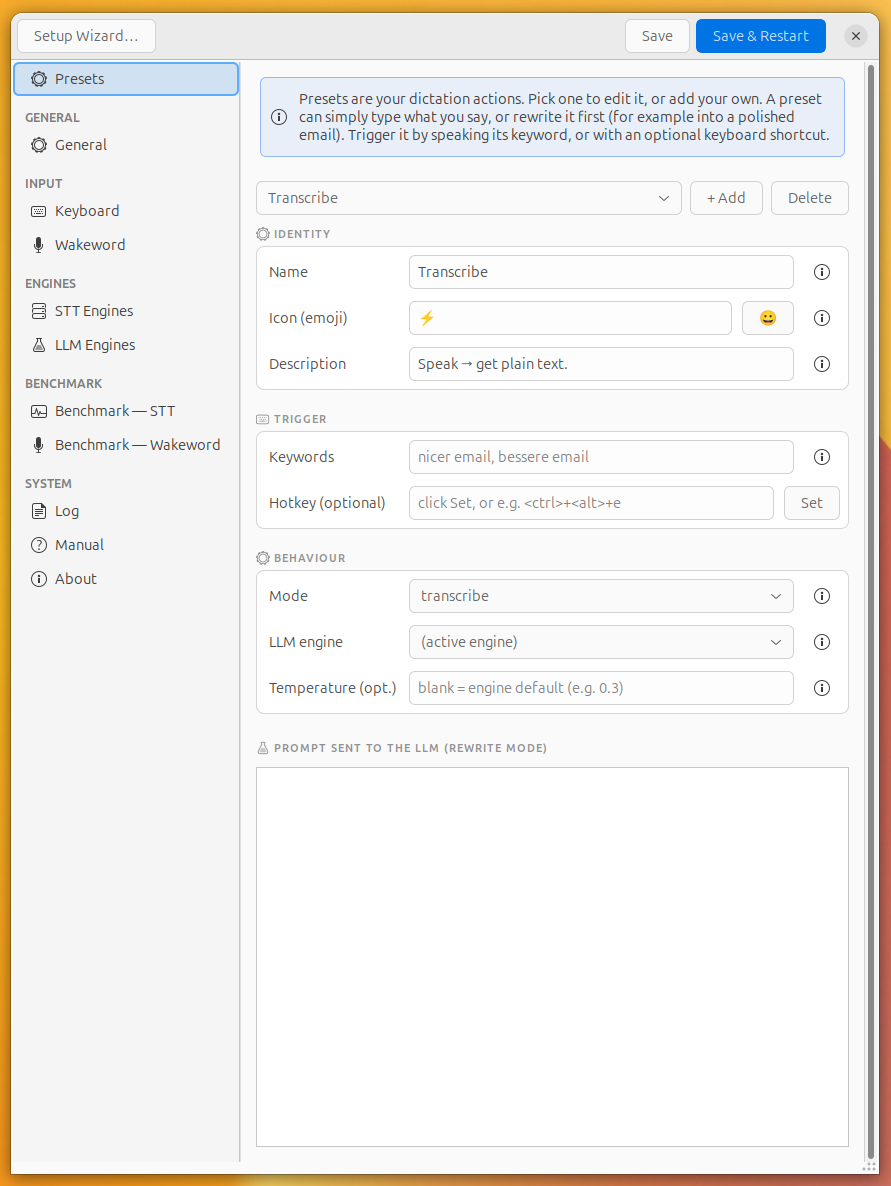
Presets are your dictation **actions**. Each one either types what you say, or
rewrites it through the language model first (e.g. into a polished email). Trigger
a preset by speaking its keyword, or with an optional keyboard shortcut.
Use the dropdown at the top to pick a preset to edit, **+ Add** to create one, or
**Delete** to remove it (you must keep at least one). Each preset maps to a
`[[workflow]]` entry in the config.
| Setting | TOML key | Description |
|---|---|---|
| **Name** | `name` | Short name for the action, shown in the main panel. |
| **Icon (emoji)** | `icon` | Emoji shown next to this preset in the "matched preset" notification — give each a distinct one to tell them apart at a glance. Default `⚡`. |
| **Description** | `description` | One line explaining what the preset does (shown in the panel). |
| **Keywords (comma)** | `keywords` | Spoken trigger words, comma-separated. Say one at the **start or end** of your speech to select this preset (fuzzy-matched, e.g. `nicer email, bessere email`). The preset's **name is always an implicit trigger**, so it works by voice even with no keywords here; add keywords for alternate/foreign-language phrasings. |
| **Hotkey (optional)** | `hotkey` | A direct keyboard shortcut for this preset. Click **Set** and press the combo, or type it (e.g. `++e`). Leave blank for keyword-only. |
| **Mode** | `mode` | `transcribe` types your words as-is · `rewrite` sends them to the language model first · `stream` shows live text from a realtime STT engine. |
| **LLM model (opt.)** | `model` | Override the language model for *this preset only*. Blank = use the active LLM engine's model. |
| **Temperature (opt.)** | `temperature` | Creativity of the rewrite, `0`–`1`. Lower is more predictable. Blank = engine default. |
| **Prompt sent to the LLM** | `prompt` | The instruction used in `rewrite` mode (e.g. "Rewrite this as a polite, professional email"). Ignored in `transcribe`/`stream` mode. |
---
## General
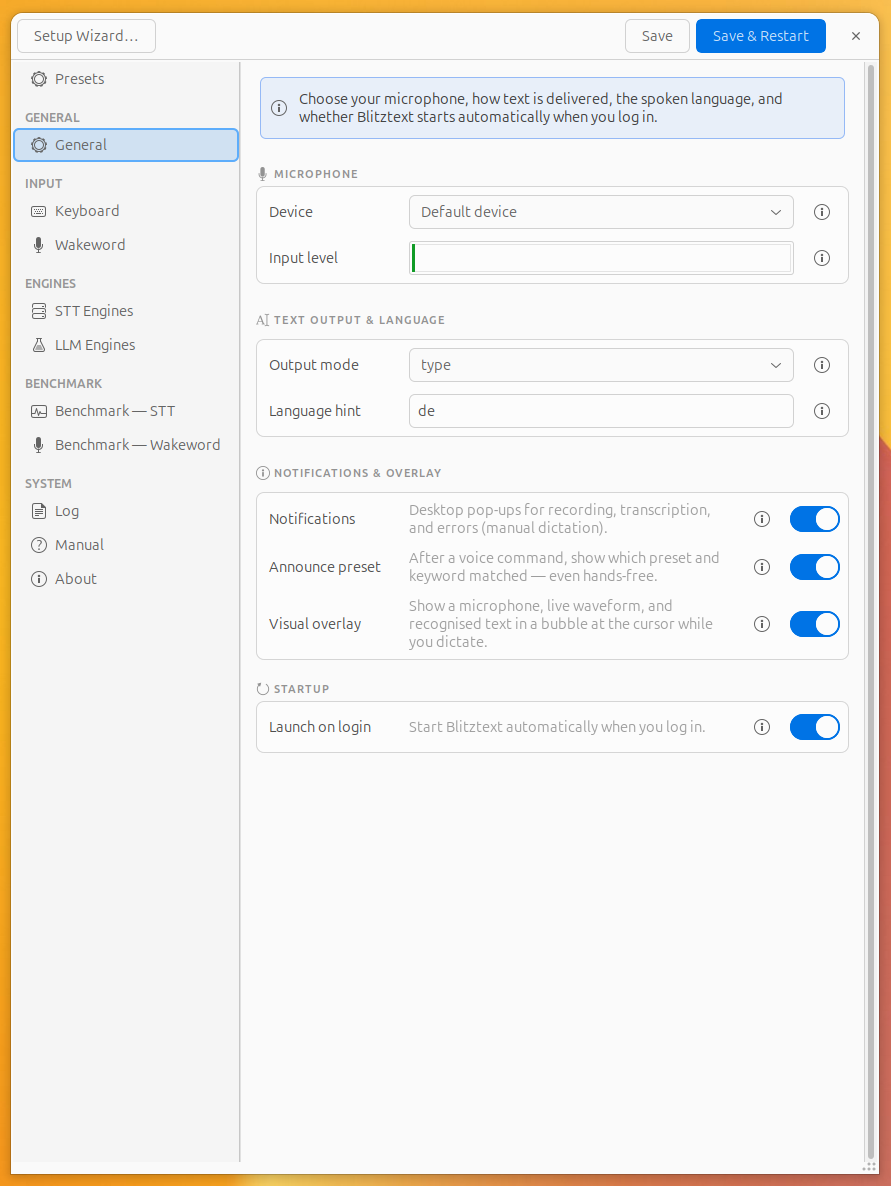
Microphone, text delivery, language, notifications, the on-screen overlay, and
autostart.
| Setting | TOML key | Description |
|---|---|---|
| **Microphone** | `mic` | Which input device Blitztext records from. |
| **Input level** | — | Live level bar (read-only); should move when you speak. |
| **Output** | `output` | `type` types the text key-by-key · `paste` copies it and presses Ctrl+V (faster for long text). |
| **Language hint** | `language` | Spoken-language code (`de`, `en`, …). Blank = auto-detect. |
| **Notifications** | `notify` | Show desktop notifications for recording/transcription status and errors (manual sessions). |
| **Announce matched preset** | `notify_routing` | After a voice command, pop a notification showing which preset (and spoken keyword) matched — shown **even for hands-free** sessions, with the preset's emoji. Only fires on a real match. |
| **Visual overlay** | `overlay_enabled` | Show a translucent bubble at the cursor while you dictate — a pulsing **microphone**, a **live waveform** of your mic level, and the **recognised text** (word-by-word with a streaming engine, or the final result as a brief confirmation). The tail points at where the text lands, and it gives **hands-free** sessions visible feedback. Click-through; never takes focus. *(X11 only.)* |
| **Launch on login** | *(autostart file)* | Start Blitztext automatically when you log in (writes a desktop autostart entry, not `config.toml`). |
---
## Keyboard
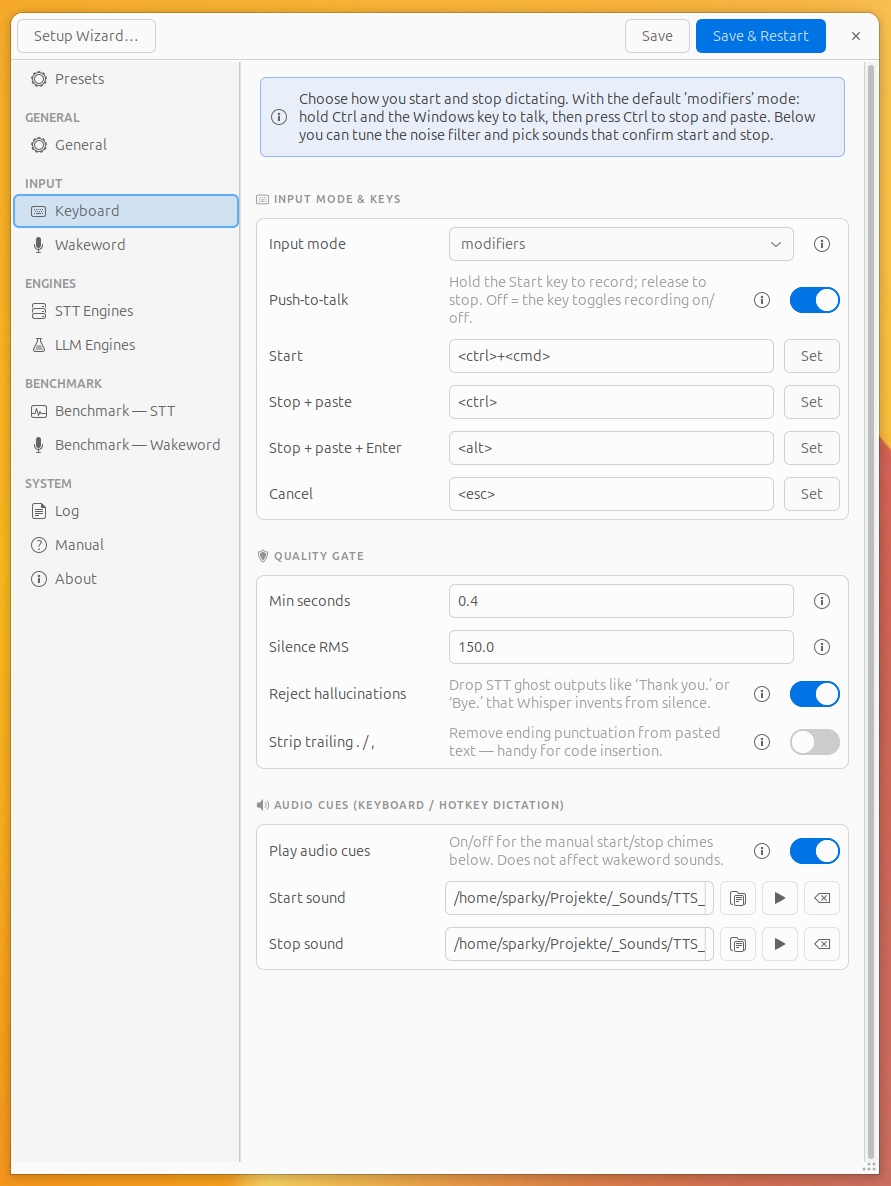
Controls **how you start and stop** dictating with the keyboard, the noise filter, and audio cues.
### Input mode & keys
All keys live in the `[input]` section.
| Setting | TOML key | Description |
|---|---|---|
| **Input mode** | `mode` | `modifiers`: hold/press the keys below · `hotkeys`: each preset uses its own shortcut combo (set per preset). |
| **Push-to-talk** | `push_to_talk` | When on, recording lasts only while the Start key is **held** (release to stop). When off, the keys **toggle** recording. |
| **Start** | `start` | Key(s) to start recording. Default `+` (Ctrl + Windows key). |
| **Stop + paste** | `stop` | Stop recording and deliver the text. Default ``. |
| **Stop + paste + Enter** | `send` | Stop, deliver, then press Enter (e.g. to send a chat message). Default ``. |
| **Cancel** | `cancel` | Discard the current recording. Default ``. |
Click **Set** next to a key field and press the combination to rebind it.
### Quality gate
Filters out clips that aren't real speech before they're transcribed. Keys live
in the `[quality]` section.
| Setting | TOML key | Description |
|---|---|---|
| **Min seconds** | `min_speech_seconds` | Minimum audio length; shorter clips are ignored. Default `0.4`. |
| **Silence RMS** | `silence_rms` | Microphone-volume threshold below which a clip counts as silent and is dropped. Default `150.0`. |
| **Reject hallucinations** | `reject_hallucinations` | Drop STT "ghost" outputs like *"Thank you."* / *"Bye."* that Whisper invents from silence. |
| **Strip trailing punctuation** | `strip_trailing_punctuation` | Remove ending periods from delivered text — handy for code insertion. |
### Audio cues (manual dictation)
These control the chimes for **manual** (keyboard/hotkey) dictation only. The
hands-free wakeword sounds are **separate and independent** (see Wakeword page).
| Setting | TOML key | Description |
|---|---|---|
| **Play audio cues** | `[sounds] enabled` | On/off for the **manual** start/stop chimes below. Does **not** affect the wakeword sounds. |
| **Play before** | `[sounds] before` | Chime when recording **starts** (manual dictation). Empty = built-in system sound. |
| **Play after** | `[sounds] after` | Chime when recording **stops** (paste, paste+Enter, or auto-stop on silence). Empty = built-in system sound. |
> Each sound row has ▶ (preview) and ⌫ (clear).
---
## Wakeword
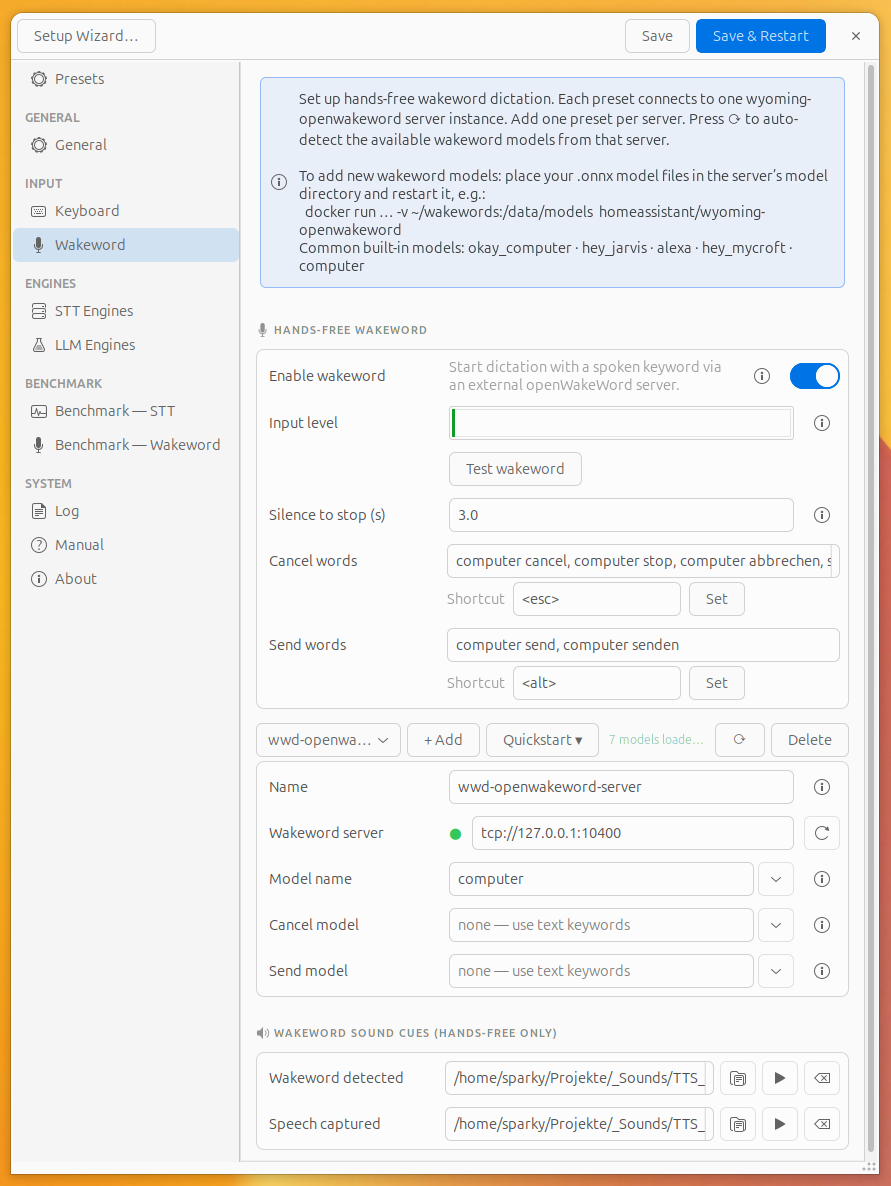
Start dictation with a spoken keyword via an external
[Wyoming](https://github.com/rhasspy/wyoming) openWakeWord server. Maps to the
`[wakeword]` section.
| Setting | TOML key | Description |
|---|---|---|
| **Enable wakeword** | `enabled` | Turn hands-free detection on/off. |
| **Wyoming URI** | `uri` | Address of the wakeword server. Default `tcp://127.0.0.1:10400`. The ⟳ button loads the available models from it. |
| **Model name** | `model` | Which wake model to listen for (e.g. `computer`, `okay_computer`). Pick from the list loaded from the server. |
| **Input level** | — | Live mic level bar (read-only) so you can confirm the microphone is being heard. |
| **Test Wakeword** | — | Listens for 10 s and reports whether the wake word was detected. |
| **Silence to stop (s)** | `silence_seconds` | After the wakeword starts recording, end it this many seconds after you stop speaking. Hands-free auto-stop (the wakeword can't be released like a key). Default `2.0`. |
| **Sound: detected** | `sound_detected` | WAV/OGA played the instant the wake word fires and recording starts — your "speak now" cue (**hands-free sessions only**). **Empty = no sound.** Independent of the *Play audio cues* switch. |
| **Sound: captured** | `sound_done` | Played when your spoken command is captured and recording stops (silence/stop) (**hands-free sessions only**). **Empty = no sound.** |
> **Tip:** A hands-free session suppresses desktop notifications, so these sounds
> are its *only* feedback — that's why they're independent of the manual "Play
> audio cues" switch, and why an empty field means silence (not a system chime).
> You can also pause/resume detection from the tray ("Pause wakeword"), which
> toggles the `/tmp/wake_muted` flag.
> **The two sound pairs differ by trigger *and* by empty-behaviour:**
>
> | | Plays on | Used for | When empty |
> |---|---|---|---|
> | *Sound: detected / captured* | start / stop | **hands-free wakeword** only | **silent** |
> | *Play before / after* | start / stop | **manual** (keyboard) only | **system chime** |
---
## STT Engines
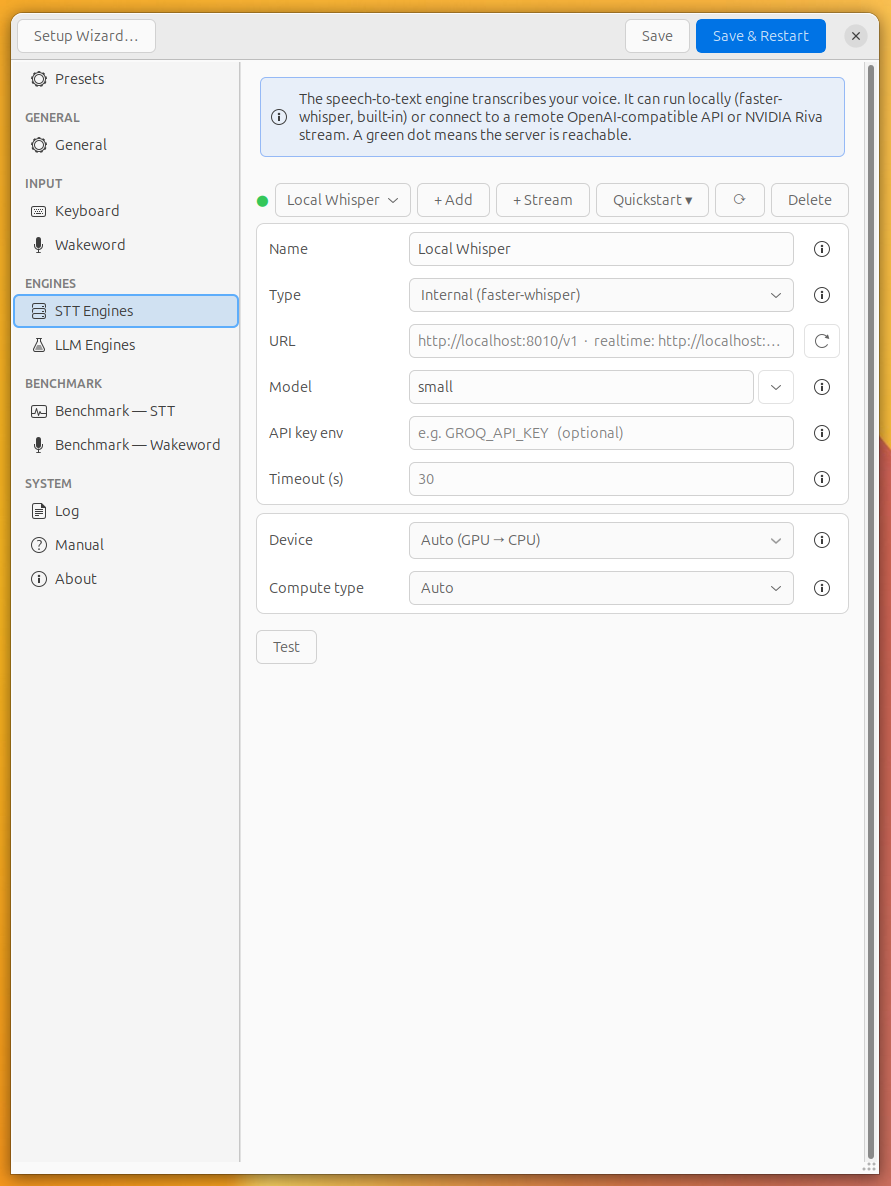
The **speech-to-text** engine turns your voice into text. Each engine can run
locally or on a server. A **green dot** means it's reachable, **red** means
offline. The active engine is the one selected in the top dropdown.
Buttons: **+ Add** (batch/cloud/OpenAI-style), **+ Stream** (realtime Riva/NIM),
**Delete**, **Test** (records 4 s and transcribes), **Refresh** (re-check status).
Each engine maps to a `[[stt_engine]]` entry; the active one is `[stt] active`.
| Setting | TOML key | Description |
|---|---|---|
| **Name** | `name` | A label for this engine (e.g. "faster-whisper GPU"). |
| **Type** | `type` | `local` (in-process faster-whisper) · `openai` (any OpenAI-compatible `/v1` STT server) · `riva_realtime` (live streaming engine). |
| **URL** | `url` | Server endpoint. Example: `http://localhost:8010/v1` · realtime: `http://localhost:8006/v1`. Ignored for `local`. |
| **Model** | `model` | Model name. For `local`: `tiny`/`base`/`small`/`medium`/`large-v3` or a path. For remote: blank = server default, or pick from the searchable list fetched from the URL. |
| **API key env** | `api_key_env` | *Name of the environment variable* holding the API key (e.g. `GROQ_API_KEY`). Optional. |
**Local engine (faster-whisper) — device & precision** (global, `[whisper]`):
| Setting | TOML key | Description |
|---|---|---|
| **Device** | `device` | `auto` (try CUDA, fall back to CPU) · `cpu` · `cuda`. |
| **Compute type** | `compute_type` | `auto` · `int8` · `float16` · `int8_float16`. Lower precision is faster and uses less memory. |
---
## LLM Engines
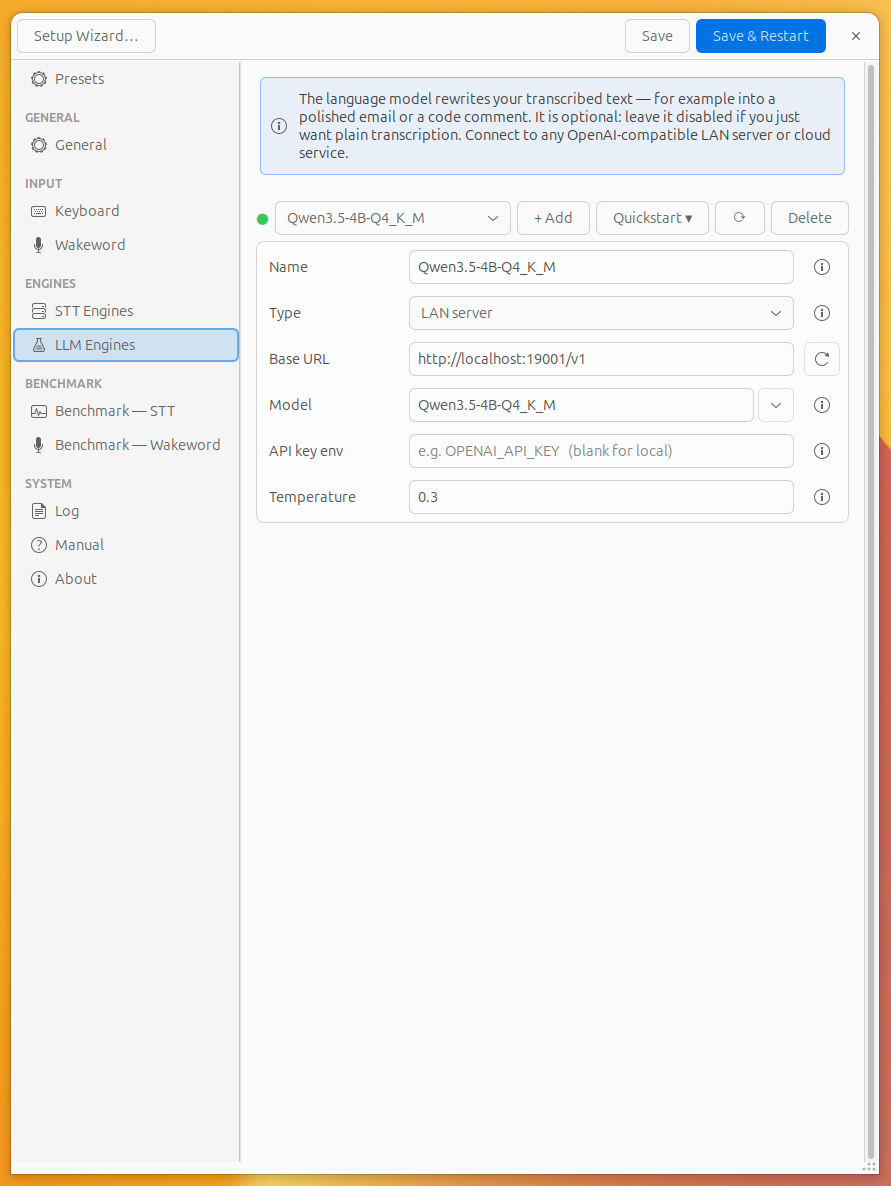
The **language model** rewrites your dictated text (e.g. into a polished email).
Each engine can be a local LAN server or a cloud service. The active engine is
the one selected in the top dropdown.
Buttons: **+ Add**, **Delete**, **Refresh**. Each maps to a `[[llm_engine]]`
entry; the active one is `[llm] active`.
| Setting | TOML key | Description |
|---|---|---|
| **Name** | `name` | A label for this LLM (e.g. "Local Qwen"). |
| **Type** | `type` | `local` (a server on this machine) or `cloud`. |
| **Base URL** | `url` | OpenAI-compatible endpoint, e.g. `http://localhost:28080/v1` or `https://api.openai.com/v1`. |
| **Model** | `model` | The model to use; pick from the list once the URL is set. |
| **API key env** | `api_key_env` | Environment-variable name holding the key (e.g. `OPENAI_API_KEY`). Blank for local servers. |
| **Temperature** | `temperature` | Default creativity for rewrites (e.g. `0.3`). Presets can override this. |
---
## Benchmark — STT
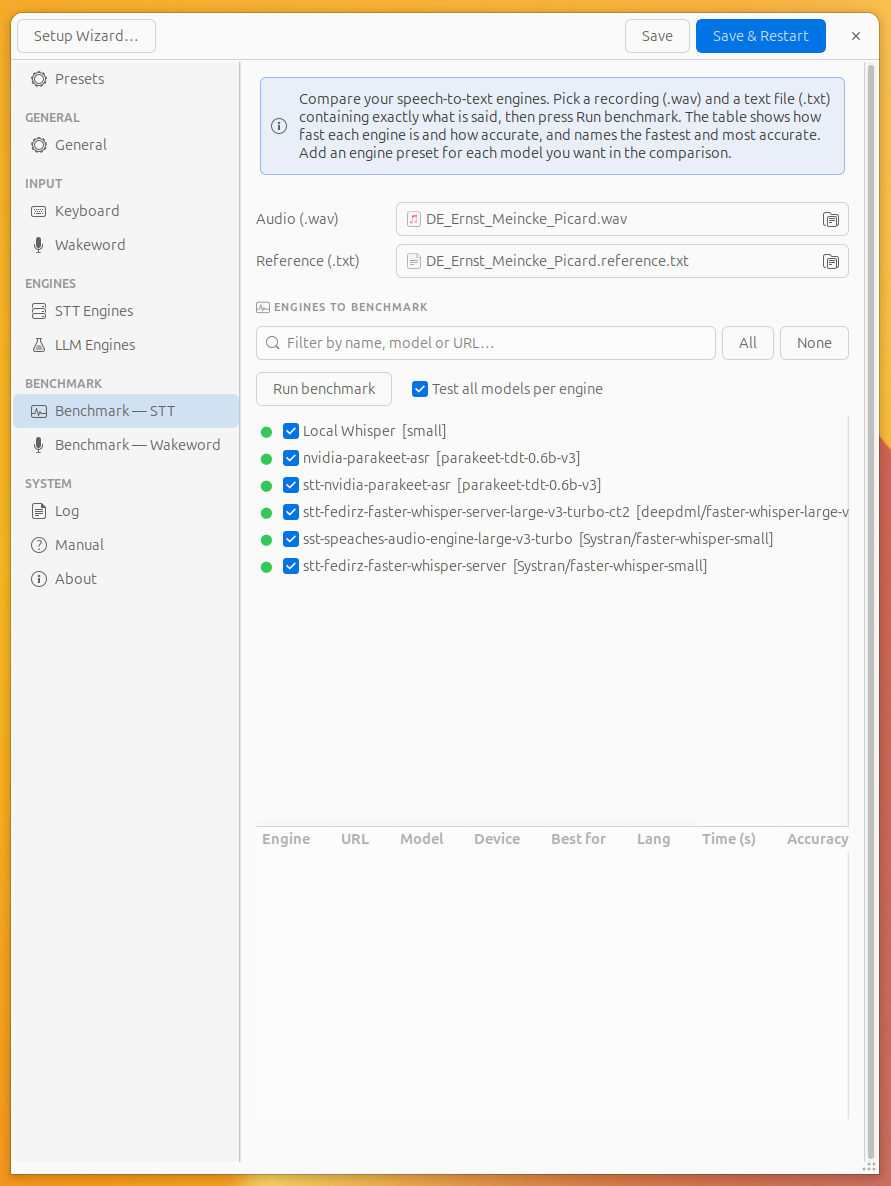
Compare your STT engines for **speed and accuracy** on the same clip. Add an
engine in the STT Engines page for each model you want to compare. No persistent
settings — it's a one-off tool.
1. **Audio (.wav)** — a recording to transcribe.
2. **Reference (.txt)** — a text file with *exactly* what is said. (Auto-filled if
a matching `*.txt` / `*.reference.txt` sits next to the WAV.)
3. **Run benchmark** — fills the table with one row per engine.
Result columns:
| Column | Description |
|---|---|
| **Engine** | Engine preset name |
| **URL** | Server address (blank for local) |
| **Model** | Model name used |
| **Device** | `CPU`, `CUDA`, or `remote` |
| **Best for** | `Short clips` · `Short / medium` · `Long / batch` · `Streaming` |
| **Lang** | Supported languages from the server's `/v1/models` (`—` if unknown) |
| **Time (s)** | Wall-clock seconds for this transcription |
| **Accuracy** | `1 − WER` × 100 %. 100 % = word-perfect, case-sensitive |
| **RAM (MB)** | RSS increase while the engine ran. Captures model load cost on first run. Remote engines show `—`. |
| **Output** | Transcribed text (hover for full error on failure) |
A summary line names the **fastest** and **most accurate** engine. Click any column header to sort.
---
## Benchmark — Wakeword
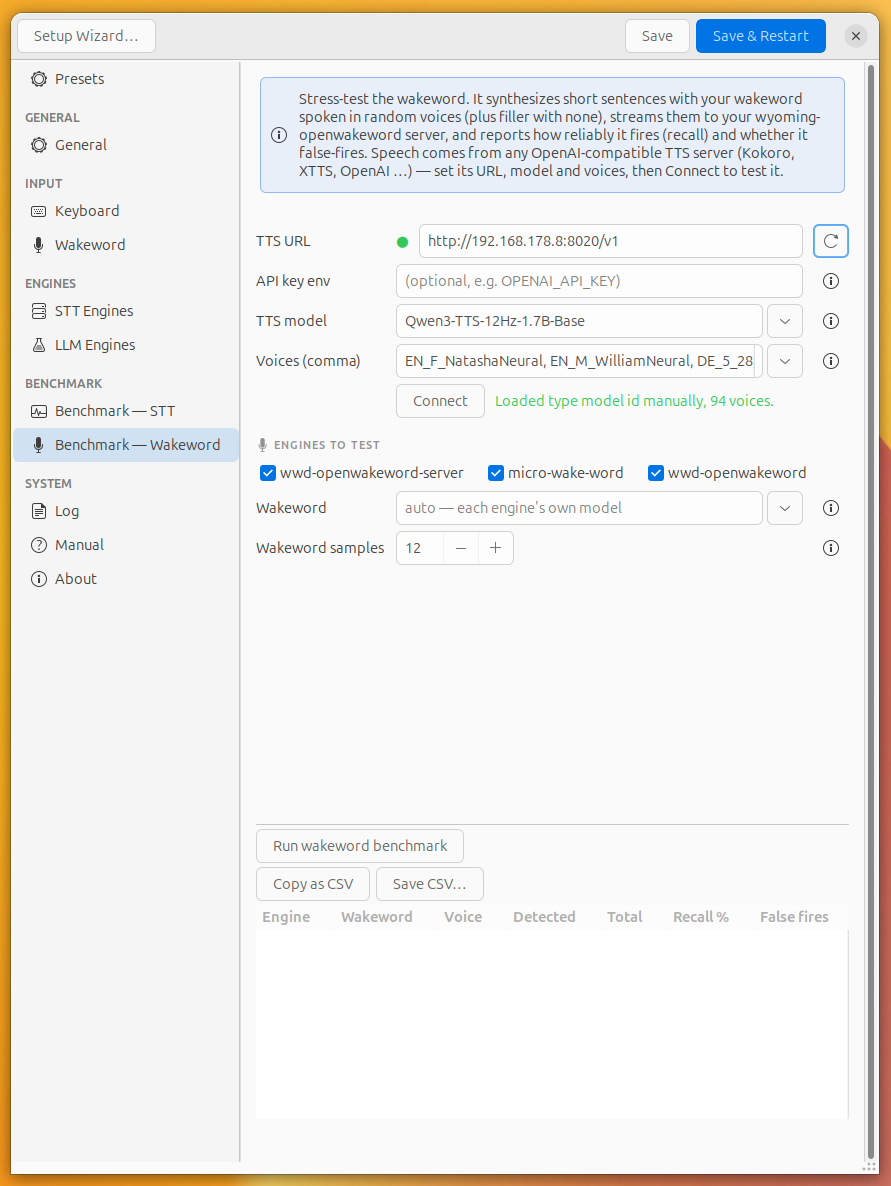
Stress-test your wakeword detection by generating speech with a TTS server and
checking whether the wake word fires correctly. Reports **recall** (how often it
fires when it should) and **false-fire rate** (how often it fires on non-wake
speech) across multiple synthetic voices.
---
## Log
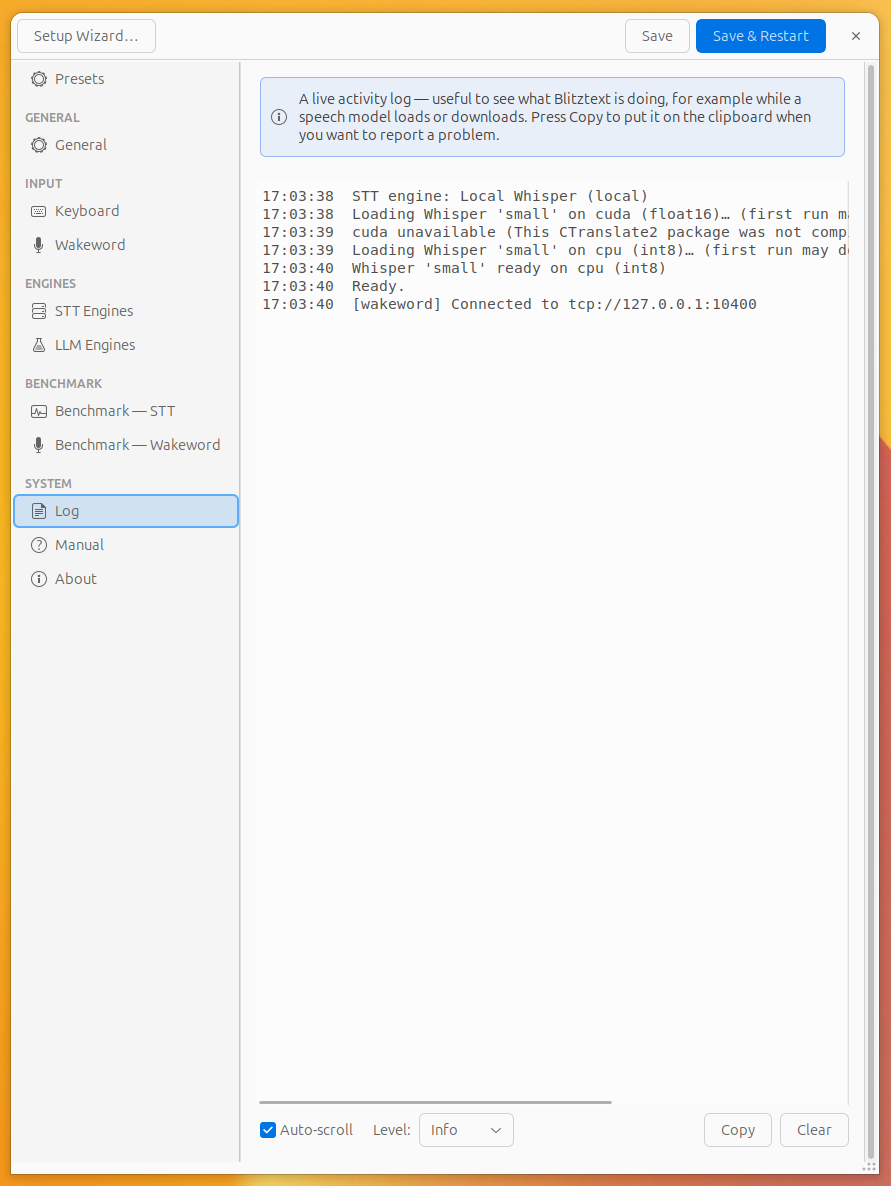
A live activity log — useful to watch a model load/download or to diagnose a
problem (recording, transcription, routing, and wakeword events all appear here).
| Control | Description |
|---|---|
| **Level** dropdown | Filter by severity: **Verbose** (all), **Info** (default), **Warning**, **Error**. Switch to Warning or Error to cut noise when troubleshooting. |
| **Copy** | Put the log on the clipboard when reporting an issue. |
| **Clear** | Discard all current log entries. |
| **Auto-scroll** | Keep the view scrolled to the latest entry. |
---
## Manual
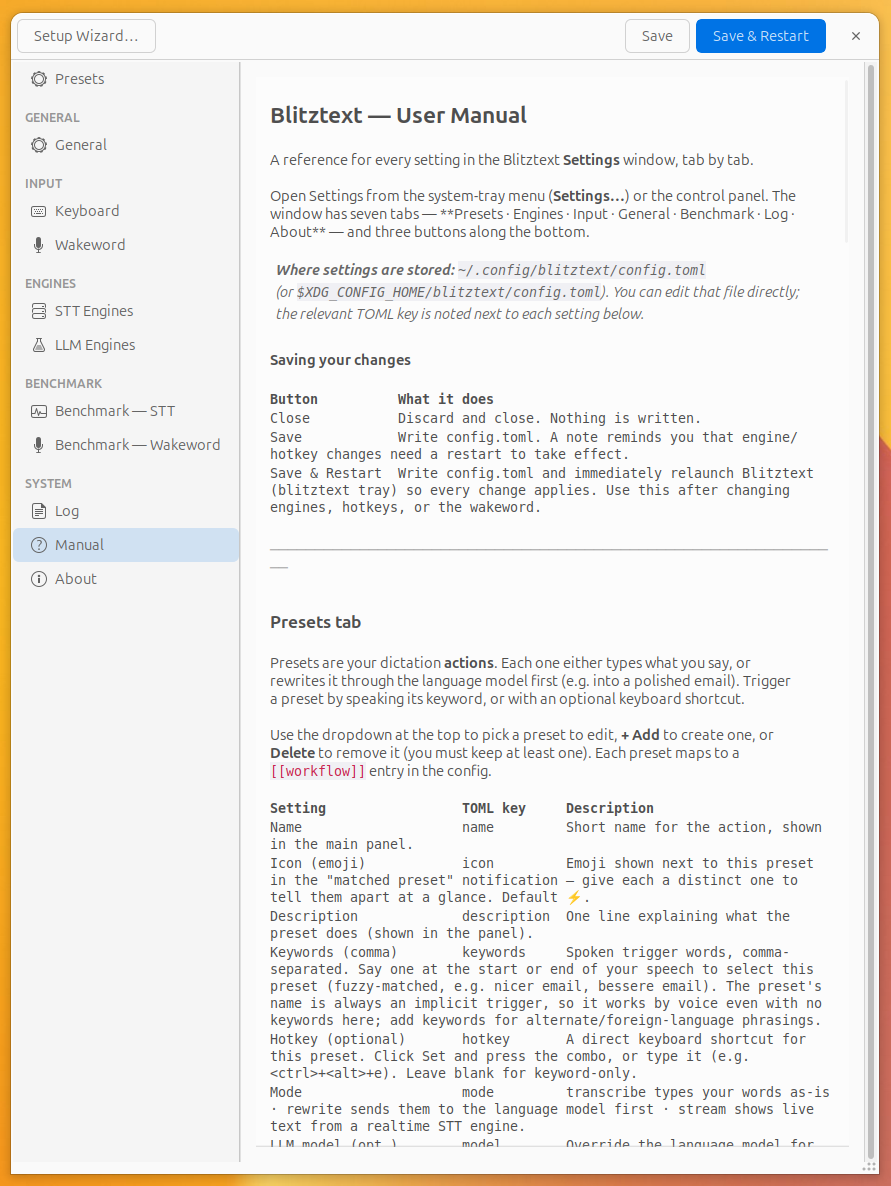
Inline copy of this manual, readable without leaving the app.
---
## About
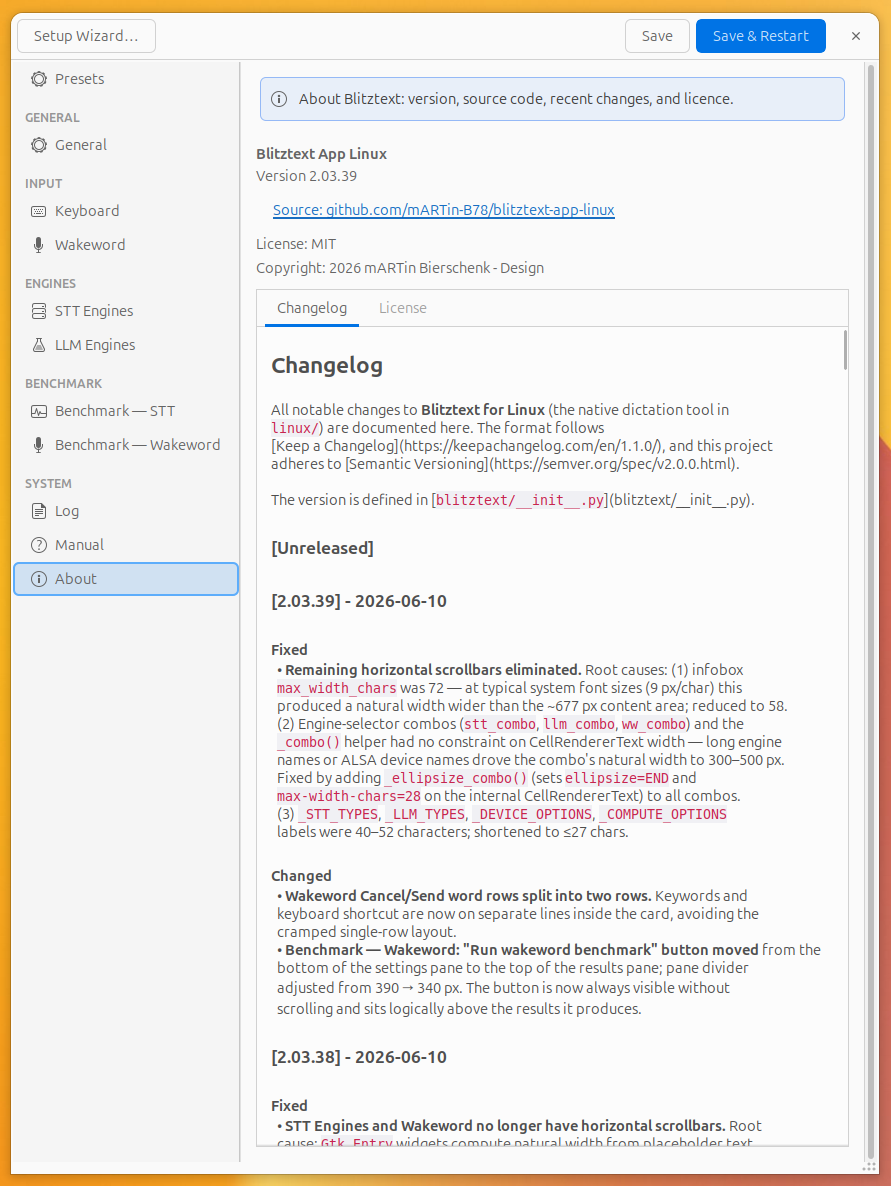
Read-only information:
- **Version** and a link to the source repository
(`github.com/mARTin-B78/blitztext-app-linux`).
- **License: MIT** · **Copyright: 2026 mARTin Bierschenk - Design**.
- Sub-tabs with the full **Changelog** and **License** text.
---
## System-tray menu (quick reference)
| Item | What it does |
|---|---|
| **● status** | Current state (Ready / Recording / Transcribing / Error). |
| *Preset names* | Click to trigger that preset. |
| **Pause wakeword** | Reversible toggle to pause/resume hands-free detection (only shown when the wakeword is enabled). |
| **Show panel** | Open the control panel window. |
| **Settings…** | Open this Settings window. |
| **Quit Blitztext** | Exit the app. |
---
## Config-only options
A few behaviours live in `config.toml` without a dedicated tab control:
- **`[routing]`** — voice-keyword routing: `enabled`, `hotkey` (one shortcut to
dictate and let the spoken keyword pick the preset), `default` (preset used when
no keyword matches), and `threshold` (`0`–`1` fuzzy-match strictness).
- **`timeout`** — network timeout (seconds) for remote STT/LLM requests.
- **`type_delay_ms`** — delay between simulated keystrokes in `type` output mode.
- **`overlay_anchor`** — where the overlay's tail points: `caret` (best-effort —
follows the focused app's text caret via AT-SPI accessibility, falling back to
the pointer), `pointer` (always the mouse pointer), or `corner` (a fixed screen
corner; also the automatic fallback on Wayland or when the cursor can't be
located). Paired with the **Visual overlay** toggle above.