 mARTin-B78
571dae7cc9
mARTin-B78
571dae7cc9
Add/Quickstart/Reload/Delete buttons + Name field mirror the STT engines UI. Four quickstart templates for common wyoming-openwakeword setups. Migration: existing wakeword_uri/model auto-promoted to first preset. Co-Authored-By: Claude Sonnet 4.6 <noreply@anthropic.com> |
||
|---|---|---|
| .github | ||
| docs | ||
| linux | ||
| Screenshots | ||
| .gitignore | ||
| CODE_OF_CONDUCT.md | ||
| CONTRIBUTING.md | ||
| install-linux.sh | ||
| LICENSE | ||
| MANUAL.md | ||
| pyrightconfig.json | ||
| README.md | ||
| ROADMAP.md | ||
| SECURITY.md | ||
| SUPPORT.md | ||
| TRADEMARKS.md | ||
| workspace.code-workspace | ||
⚡ Blitztext App Linux
Speak into any text field on your Linux desktop — instantly.
Blitztext is a native Linux dictation tool that captures your voice, transcribes it locally with faster-whisper, optionally rewrites the text through an LLM, and types the result directly into whatever application has focus. Think macOS Dictation, but open-source, extensible, and designed for power users who want full control over their speech-to-text pipeline.
Status: Experimental open-source Linux/X11 desktop app (v1.7.0). No hosted backend — bring your own models and endpoints.
📖 User manual — every setting in every tab, explained.
Inspiration & Credits
Blitztext App Linux is inspired by cmagnussen/blitztext-app, the original macOS menu-bar app for turning speech into text and cleaner writing. This Linux version recreates the workflow using Linux-native components:
| Upstream (macOS) | This project (Linux) |
|---|---|
| Swift / SwiftUI | Python 3.11+ / GTK 3 |
| WhisperKit / CoreML | faster-whisper (CTranslate2) |
| macOS Accessibility API | xdotool (X11) |
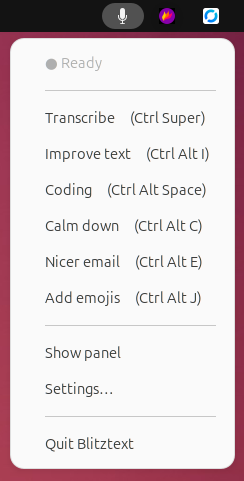
| Menu bar app | AppIndicator tray + GTK control panel |
| — | Riva/NIM realtime WebSocket STT |
| — | Voice-keyword routing |
| — | Built-in STT benchmark |
Credit to the SYSTRAN/faster-whisper project for the local Whisper inference engine, and to the pynput library for global hotkey handling.
Core Functionality & Key Differentiators
What it does
Batch:     hotkey → record mic → faster-whisper (local) → [optional LLM rewrite] → xdotool types it
Stream:    hotkey → mic PCM chunks → Riva/NIM WebSocket → live words typed as you speak
- Focus any text field — terminal, browser, email client, IDE, chat app.
- Press a hotkey (or use modifier keys, or click the tray menu).
- Speak naturally.
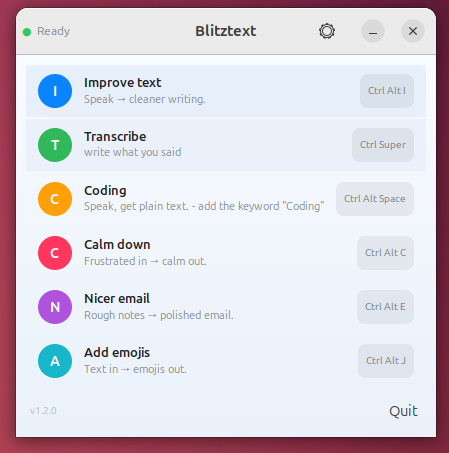
- Text appears where your cursor is — plain transcript, polished email, calmed-down message, or emoji-enriched text.
What makes it different
- Runs on the host, not in a browser. Because it uses
xdotool, it can type into any X11 application — not just a web page or Electron app. - Fully local STT. Batch transcription via
faster-whispernever leaves your machine. No cloud account needed for basic dictation. - Pluggable engines. Configure multiple STT and LLM backends as named presets — local
faster-whisper, remote OpenAI-compatible batch endpoints, Riva/NIM realtime WebSocket servers, and any OpenAI-compatible chat API (OpenAI, vLLM, llama-swap, Ollama, LM Studio, Groq, OpenRouter). - Voice-keyword routing. One hotkey, multiple workflows. Say "nicer email" at the start or end of your speech and the email-rewrite preset activates automatically (fuzzy-matched, ASR-tolerant).
- Spoken cancel. Say "abbrechen" (or "cancel") at the start or end of a clip and the whole dictation is discarded — never routed, rewritten, or typed. The rescue for an accidentally triggered (e.g. wakeword) recording. Configurable in Settings; empty list disables it.
- Quality gate. Silent clips, too-short recordings, and Whisper hallucinations ("Thank you.", "Untertitel…") are caught and rejected before they reach your text field.
- Realtime streaming. Connect a Riva/NIM realtime STT server and see stable words typed live as you speak.
- On-screen overlay at the cursor. The moment you start dictating — by hotkey or wakeword — a translucent bubble pops up at the cursor with a pulsing microphone, a live waveform of your mic level, and the recognised text. When a voice keyword routes to a preset it shows that preset's icon, name, and the matched keyword on a banner (instead of a desktop notification), and streams the LLM rewrite into the bubble token-by-token so you watch it write. Its tail points at the text caret (via accessibility) and finally gives hands-free wakeword sessions visible feedback. Click-through, never steals focus; toggle in Settings → General.
- Built-in benchmarking. Compare all your configured STT engines against a reference WAV + transcript to find the fastest and most accurate.
Screenshots
Everything is configured in the GTK Settings window — every tab has tooltips and screen-reader (ATK) support. Click any image to open it full size.

Presets — your dictation actions. Each preset is either a plain transcription or an LLM rewrite, and carries its own spoken keyword(s) for voice routing, an optional global hotkey, and a custom rewrite prompt.

Engines — your speech-to-text and language-model back-ends, local or remote. Add and rename engines, watch live online/offline status, and pick models from a searchable list fetched straight from the endpoint.

Input — how you start and stop dictation: the modifier-key scheme (Ctrl+Win / Ctrl / Alt / Esc) or custom hotkeys, plus the silence-based auto-stop (VAD), the quality gate, and audio cues.

Wakeword (hands-free) — point Blitztext at a Wyoming/openWakeWord server, choose a wake model, and test the connection live so a spoken keyword starts dictation with no keys at all.

General — core preferences: microphone with a live level meter, output mode (type vs. paste), language hint, type delay, the on-screen dictation overlay, and autostart on login.

Benchmark — compare every configured STT engine against a reference WAV + transcript to find the fastest and most accurate, with a Device column (CPU / GPU / remote).

Log — the in-app log buffer: a live view of recording, transcription, routing, and wakeword events for quick troubleshooting.

About — version, source link, changelog, and licence.
Target Use Cases
| Scenario | How Blitztext helps |
|---|---|
| Quick replies | Dictate an email or chat message instead of typing it |
| Rough-to-polished | Speak freely, let the LLM rewrite it into a professional email |
| Multilingual dictation | faster-whisper supports 99 languages; set language = "de" or "en" |
| Local-only transcription | Use faster-whisper with no network calls at all |
| Live captioning | Stream mode types words as you speak (with a Riva/NIM server) |
| Voice-driven workflows | Trigger different presets by speaking a keyword |
| STT engine comparison | Benchmark tab compares speed and accuracy across all configured engines |
| GPU or CPU | Works on CPU (int8) out of the box; add a CUDA CTranslate2 build for GPU |
Requirements
-
Linux desktop with an X11 or Wayland session (Wayland uses
wtypeorydotool) -
Python 3.11+ (for source installs)
-
Host tools:
sudo apt install xdotool libnotify-bin pipewire-bin python3-gixdotool— text delivery into the focused windowlibnotify-bin— desktop notifications (notify-send)pipewire-bin— microphone recording (pw-record); alternatives:pulseaudio-utils(parecord) oralsa-utils(arecord)python3-gi— GTK 3 / AppIndicator system tray
-
Optional: An OpenAI-compatible chat endpoint for rewrite workflows
-
Optional: A Riva/NIM realtime server for live streaming STT
Installation & Setup
Option A — One-line installer (recommended)
Install on any Ubuntu/Debian machine with a single command:
curl -fsSL https://raw.githubusercontent.com/mARTin-B78/blitztext-app-linux/main/install-linux.sh | bash
This clones the repo, builds a .deb, installs it with apt (pulling in all dependencies), and cleans up. After it finishes, Blitztext appears in your app grid.
Option B — Build the Debian package yourself
git clone https://github.com/mARTin-B78/blitztext-app-linux.git
cd blitztext-app-linux/linux
bash packaging/build-deb.sh          # → dist/blitztext_<ver>_<arch>.deb
sudo apt install ./dist/blitztext_*.deb
This installs Blitztext to /opt/blitztext, adds a Blitztext entry to your application menu, installs the app icon, and pulls in system dependencies automatically. Remove with sudo apt remove blitztext.
Option C — Run from Source (venv)
git clone https://github.com/mARTin-B78/blitztext-app-linux.git
cd blitztext-app-linux/linux
./install.sh
install.sh creates a .venv with --system-site-packages (so it sees the system python3-gi for the GTK tray), installs dependencies from requirements.txt, and writes the default config.
Important: Build the venv from
/usr/bin/python3, not a conda/miniforge Python. A conda Python can't see the apt-installedpython3-gi, so the tray won't start. The.debpackage avoids this issue entirely.
Environment Variables
The only environment variable needed is for rewrite workflows that use a cloud LLM:
export OPENAI_API_KEY=sk-... # only if using OpenAI or a keyed endpoint
The config file (~/.config/blitztext/config.toml) references environment variable names, never the keys themselves. Local STT and local LLM endpoints typically require no key.
Quickstart Tutorial
Goal: Go from zero to dictating text into a terminal in under 5 minutes.
1. Install
# Ubuntu/Debian — install host tools
sudo apt install xdotool libnotify-bin pipewire-bin python3-gi

# Clone and set up
git clone https://github.com/mARTin-B78/blitztext-app-linux.git
cd blitztext-app-linux/linux
./install.sh
2. Launch
.venv/bin/python -m blitztext tray
A microphone icon appears in your system tray. The first launch downloads the Whisper small model (~460 MB) — wait for the "Ready" notification.
3. Dictate
- Open a text editor (gedit, VS Code, a terminal, a browser text field — anything).
- Click in the text field so it has focus.
- Press
Ctrl+Super(Ctrl + Windows key) to start recording. - Speak your text naturally.
- Press
Ctrlto stop, transcribe, and type the result.
That's it. The transcribed text appears where your cursor was.
4. Try a rewrite workflow
export OPENAI_API_KEY=sk-... # or point at a local LLM in Settings
- Press
Ctrl+Super→ speak something rough like "hey john can you send me the report" - Press
Ctrl— the text appears as a plain transcript.
Now try with voice routing:
- Press
Ctrl+Alt+Space→ say "nicer email hey john can you send me the report" - Press
Ctrl— Blitztext detects the keyword, runs the "Nicer email" rewrite, and types a polished email.
4b. Cancel by voice
Started a recording by accident (or changed your mind)? Just say "abbrechen" (or "cancel") at the start or end of what you say. The whole clip is discarded — nothing is transcribed onward, routed, rewritten, or typed, and the overlay briefly shows ✗ Abgebrochen. This is especially handy with the hands-free wakeword, where a stray trigger could otherwise type ambient speech. Tune the words under Settings → Mic/Cues → "Cancel words" (or [routing] cancel_keywords); clear the list to switch it off.
5. Explore Settings
Click the ⚙️ gear icon in the panel header, or right-click the tray → Settings…
- Presets — edit workflows, hotkeys, prompts, keywords
- Engines — manage STT and LLM backends, check online status, run tests
- Input — switch between modifier keys and direct hotkeys
- General — choose microphone, output mode, language, autostart
- Benchmark — compare STT engines with a reference WAV
- Log — inspect runtime messages
- About — version, changelog, license
CLI Reference
blitztext tray               # System tray + hotkeys (default)
blitztext gui                # GTK control panel window
blitztext run                # Headless daemon, hotkeys only
blitztext transcribe f.wav   # One-shot transcription, prints text
blitztext config-path        # Print config file location
blitztext --version          # Print version
From a source checkout, prefix with .venv/bin/python -m:
.venv/bin/python -m blitztext tray
Default Workflows
| Hotkey | Workflow | Mode | What it does |
|---|---|---|---|
Ctrl+Alt+Space |
(voice routing) | auto | Routes to a preset by spoken keyword |
Ctrl+Alt+E |
Nicer email | rewrite |
Turns rough speech into a polished email |
Ctrl+Alt+I |
Improve text | rewrite |
Proofreads and improves wording |
Ctrl+Alt+C |
Calm down | rewrite |
Rewrites frustrated speech into a calm message |
Ctrl+Alt+J |
Add emojis | rewrite |
Adds fitting emojis to the text |
With the default modifiers input mode:
| Key | Action |
|---|---|
Ctrl+Super |
Start recording |
Ctrl |
Stop → transcribe → type |
Alt |
Stop → transcribe → type → press Enter |
Esc |
Cancel (discard recording) |
| say "abbrechen" / "cancel" | Cancel by voice — discard the clip (works hands-free too) |
Configuration
All settings live in ~/.config/blitztext/config.toml. Edit through the Settings UI or directly as TOML.
Local Whisper (batch STT)
[whisper]
model = "small"        # tiny | base | small | medium | large-v3
device = "auto"        # auto | cuda | cpu
compute_type = "auto"  # auto | int8 | float16
beam_size = 5
Remote batch STT
[[stt_engine]]
name = "faster-whisper-server"
type = "openai"
url = "http://localhost:8010/v1"
model = "Systran/faster-whisper-base"
Realtime STT streaming
[[stt_engine]]
name = "Nemotron ASR Streaming"
type = "riva_realtime"
url = "http://127.0.0.1:8006/v1"

[[workflow]]
name = "STT Streaming"
hotkey = "<ctrl>+<alt>+s"
mode = "stream"
LLM rewrite endpoint
[[llm_engine]]
name = "Default"
type = "cloud"
url = "https://api.openai.com/v1"
model = "gpt-4o-mini"
api_key_env = "OPENAI_API_KEY"
temperature = 0.3
For local rewriting, point at a local server:
[[llm_engine]]
name = "Local llama-swap"
type = "local"
url = "http://localhost:28080/v1"
model = "Qwen3.5-4B"
api_key_env = ""
Privacy
Blitztext does not include a hosted backend. Where your data goes depends on what you configure:
Local STT:        microphone → local faster-whisper (never leaves your machine)
Remote batch STT: microphone → your configured /audio/transcriptions endpoint
Realtime STT:     microphone → your configured Riva/NIM realtime endpoint
Rewrite:          transcript → your configured OpenAI-compatible chat endpoint
Delivery:         text → xdotool → focused X11 window
API keys are stored as environment variable names in the config, never as values. See docs/privacy.md for the full privacy model.
Project Structure
linux/
  blitztext/         Python package: GTK UI, tray, daemon, STT, LLM, config
  packaging/         Debian packaging, desktop entry, app icons
  install.sh         Venv setup script
  requirements.txt   Python dependencies
  CHANGELOG.md       Linux app changelog
  README.md          Detailed Linux usage guide
docs/                Setup, privacy, and project documentation
.github/             CI workflows, issue templates, Dependabot, secret scan
README.md            ← you are here
Run on Login
Autostart toggle (recommended)
Open Settings → General → Launch on login and enable it. This writes a freedesktop .desktop entry to ~/.config/autostart/.
systemd user service
mkdir -p ~/.config/systemd/user
cp linux/blitztext.service ~/.config/systemd/user/
# edit ExecStart if your checkout path differs
systemctl --user daemon-reload
systemctl --user enable --now blitztext
Current Limitations
- Wayland support requires
wtypeorydotool. Wayland security prevents global window focus manipulation, so text is delivered to whatever window is active when delivery occurs. - No automated tests yet. Contributions welcome (routing, quality gate, config parsing are all highly testable).
- Realtime streaming requires a compatible Riva/NIM server.
- The on-screen overlay is X11-only (it positions a window at the cursor and reads the pointer/caret); on Wayland it falls back to a fixed screen corner. Caret-accurate anchoring further needs the focused app to expose its text caret over AT-SPI accessibility — otherwise it follows the mouse pointer.
- Local STT speed depends on your hardware, Whisper model size, and CTranslate2 build (CPU
int8by default). - This is experimental software provided as-is.
Contributing
See CONTRIBUTING.md for guidelines.
Good first contributions:
- Add unit tests for
routing.py,quality.py,config.py,benchmark.py - Add a short demo GIF or additional screenshots
- Improve error messages and first-run setup
- Document known-good STT/LLM engine configurations
- Document known-good Wayland configurations for specific compositors
Quick development loop:
cd linux
./install.sh
.venv/bin/python -m py_compile blitztext/*.py   # syntax check
.venv/bin/python -m blitztext --version          # smoke test
.venv/bin/python -m blitztext gui                # run the GUI
Please read SECURITY.md before reporting vulnerabilities.
License
This project is released under the MIT License. See LICENSE.
MIT License

Copyright (c) 2026 Blitztext contributors

Permission is hereby granted, free of charge, to any person obtaining a copy
of this software and associated documentation files (the "Software"), to deal
in the Software without restriction, including without limitation the rights
to use, copy, modify, merge, publish, distribute, sublicense, and/or sell
copies of the Software, and to permit persons to whom the Software is
furnished to do so, subject to the following conditions:

The above copyright notice and this permission notice shall be included in all
copies or substantial portions of the Software.

THE SOFTWARE IS PROVIDED "AS IS", WITHOUT WARRANTY OF ANY KIND, EXPRESS OR
IMPLIED, INCLUDING BUT NOT LIMITED TO THE WARRANTIES OF MERCHANTABILITY,
FITNESS FOR A PARTICULAR PURPOSE AND NONINFRINGEMENT. IN NO EVENT SHALL THE
AUTHORS OR COPYRIGHT HOLDERS BE LIABLE FOR ANY CLAIM, DAMAGES OR OTHER
LIABILITY, WHETHER IN AN ACTION OF CONTRACT, TORT OR OTHERWISE, ARISING FROM,
OUT OF OR IN CONNECTION WITH THE SOFTWARE OR THE USE OR OTHER DEALINGS IN THE
SOFTWARE.
Project names, logos, and app icons are not automatically granted as trademarks or brand assets. See TRADEMARKS.md.
Legal / Impressum & Datenschutz
This is an experimental, non-commercial open-source project, provided as-is under the MIT License without warranty or support. Nothing is sold here and no installation or operation is performed on your behalf.
The companion website (blitztext.de) is operated by Blackboat Internet GmbH:
- Impressum: https://martin-bierschenk.de/impressum/
- Datenschutz / Privacy: https://martin-bierschenk.de/datenschutz/